Best Call Center CRM Software in India: A Practical Buyer’s Guide
If your call center still runs on spreadsheets, sticky notes and a shared Excel sheet for follow-ups, you already know the problem. Leads go cold. Agents forget callbacks. Managers have no real idea how many calls actually happened today.
This is exactly what call center CRM software is built to fix. It gives your telecalling team one place to manage leads, dial faster, log every call, and see performance in real time. Businesses that run outbound campaigns at scale often turn to a dedicated call center CRM instead of a generic sales CRM, simply because outbound calling has different needs — dialing speed, disposition tracking, and floor-level supervision.
This guide explains what call center CRM software actually does, which features matter, how to evaluate options, and common mistakes Indian businesses make while choosing one.
What Is Call Center CRM Software?
Call center CRM software is a system built specifically for outbound and inbound calling teams. It combines lead management, call handling, and reporting in one platform, instead of forcing agents to switch between a dialer, a spreadsheet and a messaging app.
In short: a call center CRM helps your team store leads, dial them efficiently, record what happened on each call, schedule follow-ups, and track team performance — all from a single dashboard.
This is different from a generic CRM, which is usually built around deals and pipelines for field sales or account management. A call center CRM is built around the call itself — who was called, what was said, what happens next.
Who Actually Needs a Call Center CRM?
Not every business needs the same kind of CRM. Call center CRM software is most useful for teams where calling is the primary sales or support activity, such as:
- BPOs and outsourced call centers running client campaigns
- Real estate teams following up on portal and ad leads
- Education consultancies handling admission enquiries
- Insurance and financial services teams doing outbound sales
- Recruitment agencies sourcing and screening candidates by phone
- B2B sales teams running high-volume outbound prospecting
- Debt collection and loan recovery teams managing structured follow-ups
If your team makes more than a handful of calls a day and struggles to track outcomes consistently, a telecalling-focused CRM will usually help more than a general-purpose one.
Why Generic CRMs Often Fall Short for Calling Teams
Many businesses start with a general CRM and later realise it wasn’t built for high-volume calling. Common gaps include:
- No built-in dialer, so agents dial manually from a phone
- No call disposition tracking, so managers can’t see call outcomes
- Weak follow-up reminders, leading to missed callbacks
- No live view of what agents are doing right now
- Reports that show deals, not calls, talk time, or connect rates
These gaps don’t always show up on day one. They surface once a team grows past a handful of agents and managers need real visibility into daily calling activity.
Must-Have Features in a Call Center CRM
Before comparing vendors, it helps to know what actually matters. Here are the core capabilities worth checking.
1. Auto Dialer
An auto dialer moves agents from lead to lead without manual dialing. This alone can significantly increase the number of calls an agent makes in a day, since time isn’t lost searching for numbers or dialing manually.
2. Lead Management and Import
Your team should be able to import leads from a CSV or Excel file in minutes, with automatic de-duplication so the same number doesn’t get called twice by different agents.
3. Lead Source Integrations
Most calling teams get leads from more than one place — Facebook and Instagram ads, Google Ads, property portals, JustDial, website forms, or Google Sheets. A good telecalling software should pull these into one pipeline automatically instead of requiring manual uploads every day.
4. Call Tracking and Disposition Logging
Every call should be logged with duration and outcome — connected, not answered, interested, not interested, and so on. Without this, managers are left guessing what actually happened on the floor.
5. Follow-Up and Callback Scheduling
A lead management software is only useful if follow-ups actually happen. Reminders, overdue alerts, and recurring callback scheduling stop leads from slipping through the cracks.
6. Real-Time Analytics and a Live Floor View
Supervisors need to see, in real time, who is on a call, who is idle, and how the team is tracking against targets — not wait for an end-of-day report.
7. DNC (Do Not Call) Compliance
Skipping DNC-listed numbers automatically reduces compliance risk and avoids unnecessary complaints, which matters for regulated industries like finance and insurance.
8. Mobile Access
Field agents and remote telecallers need to call, log outcomes, and check follow-ups from a phone, not just a desktop dashboard.
9. Sales Pipeline and Revenue Tracking
For teams that sell rather than just log enquiries, attaching a deal value to each lead and tracking it through stages gives a clearer picture of revenue, not just call volume.
Comparison: Generic CRM vs Call Center CRM
| What You Need | Generic CRM | Call Center CRM Software |
|---|---|---|
| Auto dialer | Rarely built-in | Core feature |
| Call disposition tracking | Limited | Built for this |
| Lead source integrations | Varies | Often 10+ sources |
| Live agent/floor monitoring | Not typical | Standard feature |
| Follow-up reminders | Basic | Purpose-built |
| DNC compliance checks | Manual | Often automated |
| Best suited for | Field sales, account management | Outbound/inbound calling teams |
How to Evaluate Call Center CRM Software: A Simple Checklist
Use this checklist while shortlisting vendors:
- Does it have a real auto dialer, or just click-to-call?
- Can you import leads from Excel or another CRM without technical help?
- Does it integrate with the lead sources you actually use — ads, portals, website forms?
- Can supervisors monitor the floor in real time?
- Are follow-ups and callbacks automatically scheduled and tracked?
- Does it support DNC checks and basic compliance needs?
- Is there a mobile app for agents who work outside the office?
- Is pricing per user, or flat per team — and does it match your team size?
- Is customer support available in a time zone and language that works for you?
- Can you try it before committing, ideally without a long-term contract?
Common Mistakes Businesses Make While Choosing a CRM
- Choosing on price alone. A cheap plan that lacks a real dialer or reporting often costs more in lost productivity than it saves in fees.
- Ignoring per-user pricing traps. Some CRMs look affordable until you add agents, and per-user charges add up fast for growing teams.
- Skipping the trial period. Features that look good in a demo don’t always work the same way with your actual lead volume and team size.
- Not checking lead source integrations. If your leads come from property portals or ad platforms and the CRM doesn’t connect to them, someone ends up manually uploading leads every day.
- Overlooking mobile usability. A CRM that only works well on desktop creates friction for field agents and remote telecallers.
- Not planning for compliance. DNC violations and unsolicited calls can lead to complaints and penalties, so compliance features shouldn’t be an afterthought.
Real-World Example: A Growing Outbound Team
Consider a mid-sized insurance sales team of 12 agents making outbound calls to leads from Facebook ads and a website form. Before adopting a call center CRM, leads sat in two separate spreadsheets, agents dialed manually, and managers only found out about missed follow-ups when a customer complained.
After moving to CRM for telecallers with an auto dialer, automatic lead assignment, and follow-up reminders, the same team could track exactly how many calls were made, which leads were interested, and which callbacks were pending — without a manager having to chase every agent individually. This is a hypothetical scenario, but it reflects the kind of operational gap that call center CRM software is designed to close.
How TeleCalling CRM Fits Into This
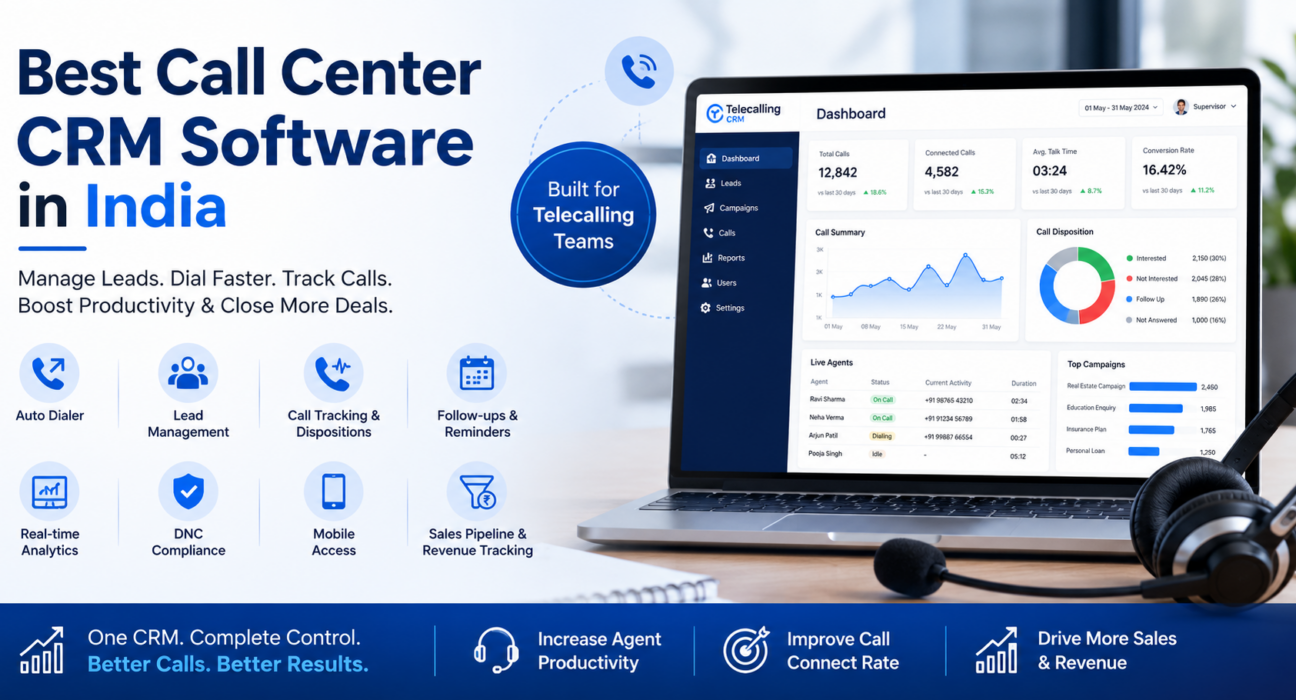
TeleCalling CRM is built specifically for outbound and inbound calling teams in India. It includes a smart auto dialer, lead import with de-duplication, call tracking with duration and outcome logging, follow-up scheduling, a live war room for supervisors, and integrations with sources like Facebook and Instagram Lead Ads, Google Ads, property portals such as 99acres, Housing and MagicBricks, JustDial, and Google Sheets.
It also includes DNC list management, role-based access, an Android and iOS mobile app, and a sales pipeline with deal-value tracking. Every plan includes the same core feature set, with plans differing mainly by the number of users. You can review current pricing and plan details directly, since plans and limits can change over time.
This isn’t the only option in the market, and the right fit depends on your team size, budget, and which lead sources you use. The checklist above should help regardless of which sales calling software you eventually choose.
Frequently Asked Questions
What is the difference between a call center CRM and a regular CRM?
A call center CRM is built around the call itself — dialing, disposition tracking, and floor monitoring — while a regular CRM is usually built around deals and long sales cycles. Calling teams generally get more value from CRM software designed specifically for telecalling.
Is call center CRM software only for large BPOs?
No. Small teams of five to ten agents benefit just as much, especially if follow-ups are currently tracked manually. The main requirement is that calling is a core part of the daily workflow, not the team size.
Does a call center CRM include an auto dialer by default?
Not always. Some CRMs charge extra for dialing features or only offer click-to-call. It’s worth confirming whether the auto dialer is included in the base plan before signing up.
Can call center CRM software help with DNC compliance in India?
Many platforms, including TeleCalling CRM, include DNC list management that automatically skips numbers on the Do Not Call registry, which reduces compliance risk for outbound campaigns.
How much does call center CRM software cost in India?
Pricing varies by vendor and whether it’s charged per user or as a flat team plan. It’s worth comparing total cost for your actual team size, not just the entry-level price, since per-user charges can add up quickly.
Can I migrate my existing leads from Excel into a call center CRM?
Most modern platforms support CSV or Excel import with automatic de-duplication, so migrating existing leads is usually straightforward and doesn’t require technical help.
Is a mobile app necessary for a call center CRM?
It depends on your team. If you have field agents or remote telecallers, a mobile app that supports calling, logging outcomes, and checking follow-ups is important. Desk-based teams may rely more on the desktop dashboard.
Conclusion
Choosing call center CRM software isn’t just about picking the cheapest plan or the most popular name. It’s about matching features — auto dialing, lead integrations, follow-up tracking, and live reporting — to how your team actually works.
Start with the checklist in this guide, shortlist two or three options, and test them with your real leads before committing. If you want to see how a purpose-built system works in practice, you can explore TeleCalling CRM’s features and try it with your own team.